SinSpam
Let your circle ring.
Choose free Extreme Mode to receive calls from your contacts and customize your allowed numbers. When your day calls for a different filter, switch to Low, Medium or High in the same app.
SinSpam · Truecaller · Phone by Google
With SinSpam Extreme Mode, receive calls from your contacts and the numbers you allow. It is included free in the same app.
Free · Android 10 or later · English, Spanish and Portuguese
Let the calls you choose ring
Your phone interrupts you for a few seconds. You read “Suspected spam” and dismiss the call. Getting back on track can take much longer.
SinSpam Extreme Mode blocks before the ringtone. Your circle and allowed numbers can still call. Everything included free.
Three ways to receive calls
Compare documented Android features: from identifying callers to receiving calls from your circle.
Scroll the table sideways to see all three options.
| What to compare | SinSpam | Truecaller | Phone by Google |
|---|---|---|---|
| Cost of access | Everything included free No subscriptions or paid features. Supported by mercax.com. [8] |
Free and Premium Free version and paid plans. The Max level is Premium. [1] [3] |
Free download |
| Block numbers outside Contacts | Free Extreme Mode Receive calls from your contacts and the numbers you allow. [8] |
Setting available Offers a setting to block numbers not saved in your address book on Android. [2] |
“Unknown” means something different That setting blocks private or unidentified numbers. It allows visible numbers not in Contacts. [4] |
| Adjust protection | Four levels Low, Medium, High and Extreme, plus your rules to allow or block numbers. [8] |
Levels and settings Free Basic, Premium Max and additional blocking options. [1] [2] |
Spam protection and Call Screen Spam settings and Call Screen levels on supported Pixel phones. [5] [6] |
| Information about the caller | Number and opinions “Annoying” and “Not annoying” votes, call history and counts per number. [8] |
Caller ID and search Caller identification and number lookup. [1] |
Caller ID and spam warnings Identifies businesses and warns of possible spam calls. Also offers automatic filtering. [5] |
Truecaller also offers blocking outside your address book. Its cited sources do not specify the plan required for that particular setting; no price is assigned to it here. In SinSpam, Extreme Mode is included free.
Each option has its own approach
SinSpam
Choose free Extreme Mode to receive calls from your contacts and customize your allowed numbers. When your day calls for a different filter, switch to Low, Medium or High in the same app.
Truecaller
Combines caller identification, number lookup and blocking tools, including the setting for numbers outside your address book. Offers a free version and Premium plans. [1] [2]
Phone by Google
Offers business identification and spam protection. On supported devices and in supported countries, Call Screen can ask who is calling and why before you answer. [5] [6]
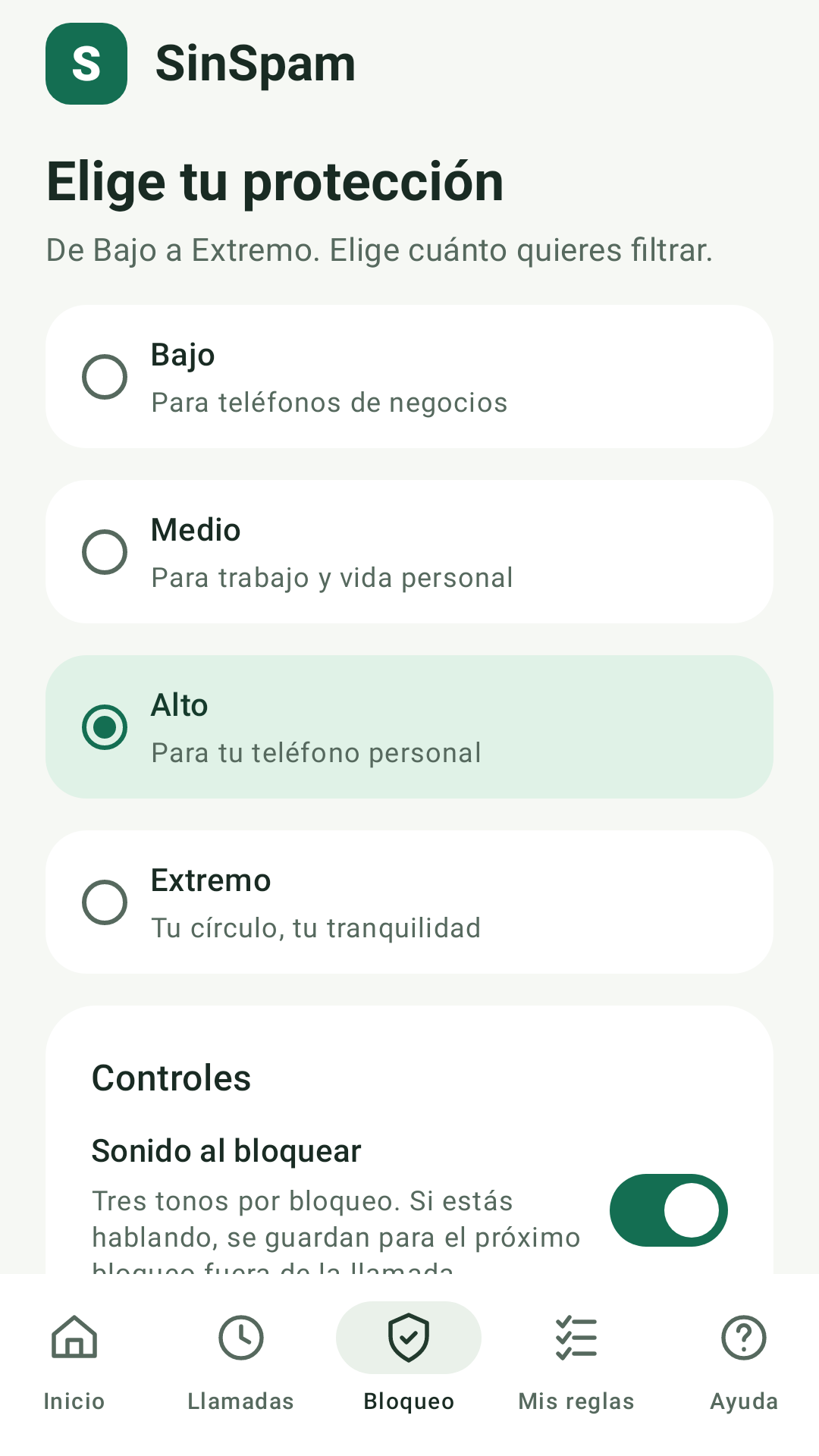
Four levels, one app
In My rules you can allow or block a number. In Calls you can review your history, including blocked calls, and call back.
Use SinSpam as your filter and keep using your phone’s dialer. Learn how to activate it and grant access →
For an informed choice
Yes. Extreme Mode is included free in SinSpam, with no subscriptions or paid features, thanks to support from mercax.com. It is in the same app as Low, Medium and High.
Yes. Truecaller documents an Android setting to block numbers not saved in your address book. It also offers a free version and Premium plans. The cited sources do not specify the plan for that particular setting; SinSpam includes Extreme Mode free.
No. Google explains that this setting blocks private or unidentified numbers and allows visible numbers outside Contacts. SinSpam Extreme Mode is focused on your contacts, and you can allow specific numbers with My rules. Google also offers Call Screen, with features depending on device and country.
Yes. Low, Medium, High and Extreme are in one app. Change levels in SinSpam and create rules to allow or block specific numbers.
Open Calls to review history, including blocked calls, and call back. In My rules, allow or block specific numbers. SinSpam works as your filter while you keep using your phone’s dialer.
No. Google documents spam warnings and an option to filter those calls automatically. Depending on the device, blocking is also part of Call Screen. Identifying a call and blocking it are different features.
Yes. In an experiment, 2.8-second interruptions doubled errors when resuming a task sequence. Another study found an attention cost from receiving calls even without interacting with the phone. Recovery times vary by task and context.
Yes. SinSpam filters on the phone using community information already downloaded. Connect to receive updates and send pending contributions.
Documented Android features. Checked: . This page is published by SinSpam; it compares features without assigning effectiveness scores or measuring which app blocks more calls.
To activate SinSpam and learn about its required access, see help. Information about filter data is in the app privacy notice. Truecaller and Google are trademarks of their respective owners.
Extreme Mode is part of SinSpam for Android.